This page uses a tracking cookie to measure ad performance. You can accept or reject it. Either way, the page works exactly the same.
How KatisoBiz works
Everything in one place. Getting set up takes about ten minutes, and after that a quote takes under a minute.
Getting started, in six steps
Do the first two and you can send a quote. The rest can wait until you need them.
- 1
Put in your business details
Go to Settings then Business details. Your business name, address and phone go on every document. If you are registered for VAT, put your number in the VAT number box and every invoice becomes a proper Tax Invoice by itself. If you are not registered, leave it blank and KatisoBiz never mentions VAT again.
About 2 minutes
- 2
Add your banking details
Settings then Banking details. This is how your customer pays you, so nothing gets paid until it is done. You enter it once and it prints on every invoice with your invoice number as the reference. Changing it later needs a code from your email, on purpose, so nobody who gets into your account can quietly swap in their own account number.
About 2 minutes
- 3
Save the prices you charge most
Price list then Add a price. Your callout fee, your hourly rate, the parts you fit most often. You can skip this entirely and come back, but every price saved here is one you never type again. You can also save a price straight off a quote later with Save to price list, so the list builds itself while you work.
As long as you like, and you can come back
- 4
Build your first quote
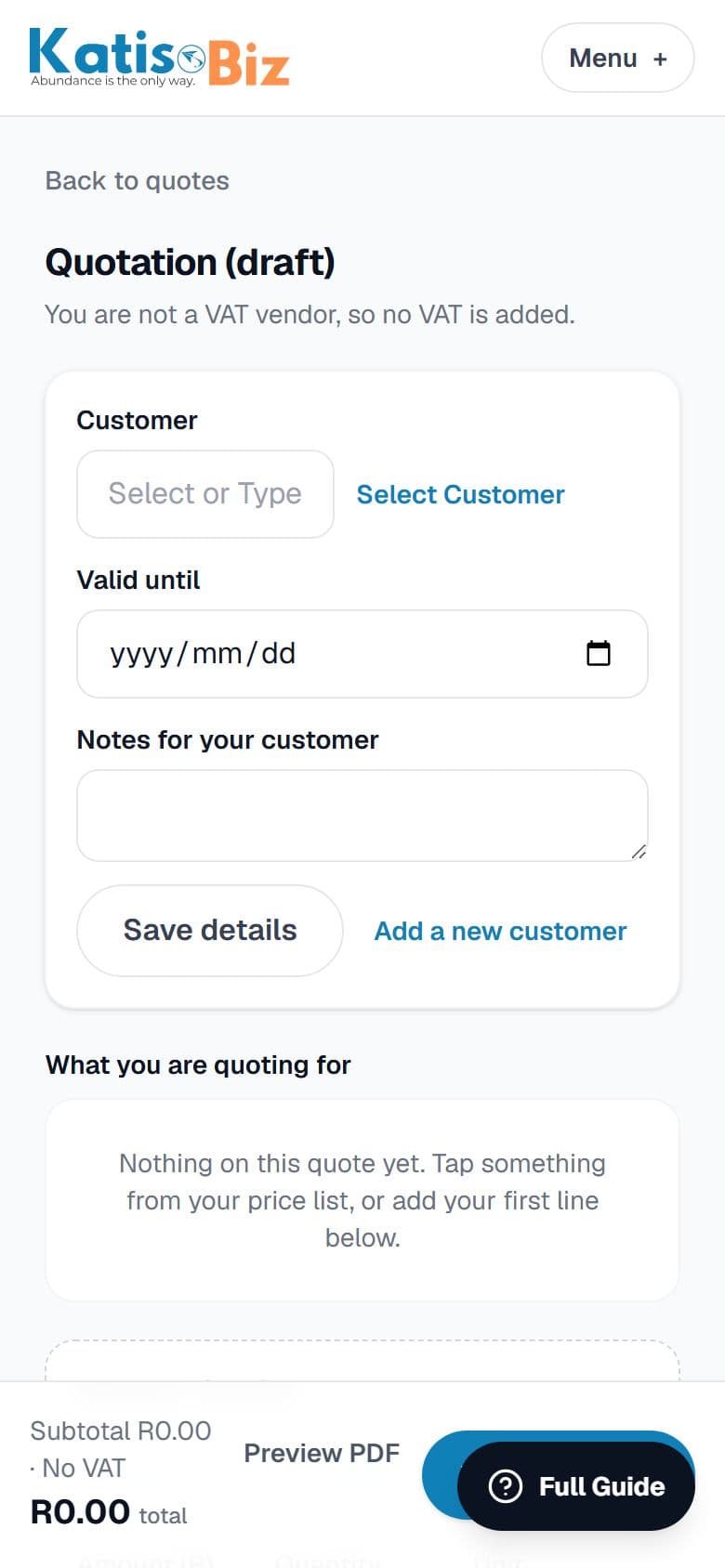
Press New quote on your home screen. Choose the customer, or press Add a new customer right there if they are new. Search your price list or type a one-off line. The total works itself out as you go.
Under a minute once your prices are in
- 5
Send it
Press Issue this quote, which gives it a number and locks the amounts, then Send on WhatsApp. Your own WhatsApp opens with the message already written and a link to the quote, so it arrives from a number your customer recognises. You can see when they open it.
Seconds
- 6
Turn it into an invoice and get paid
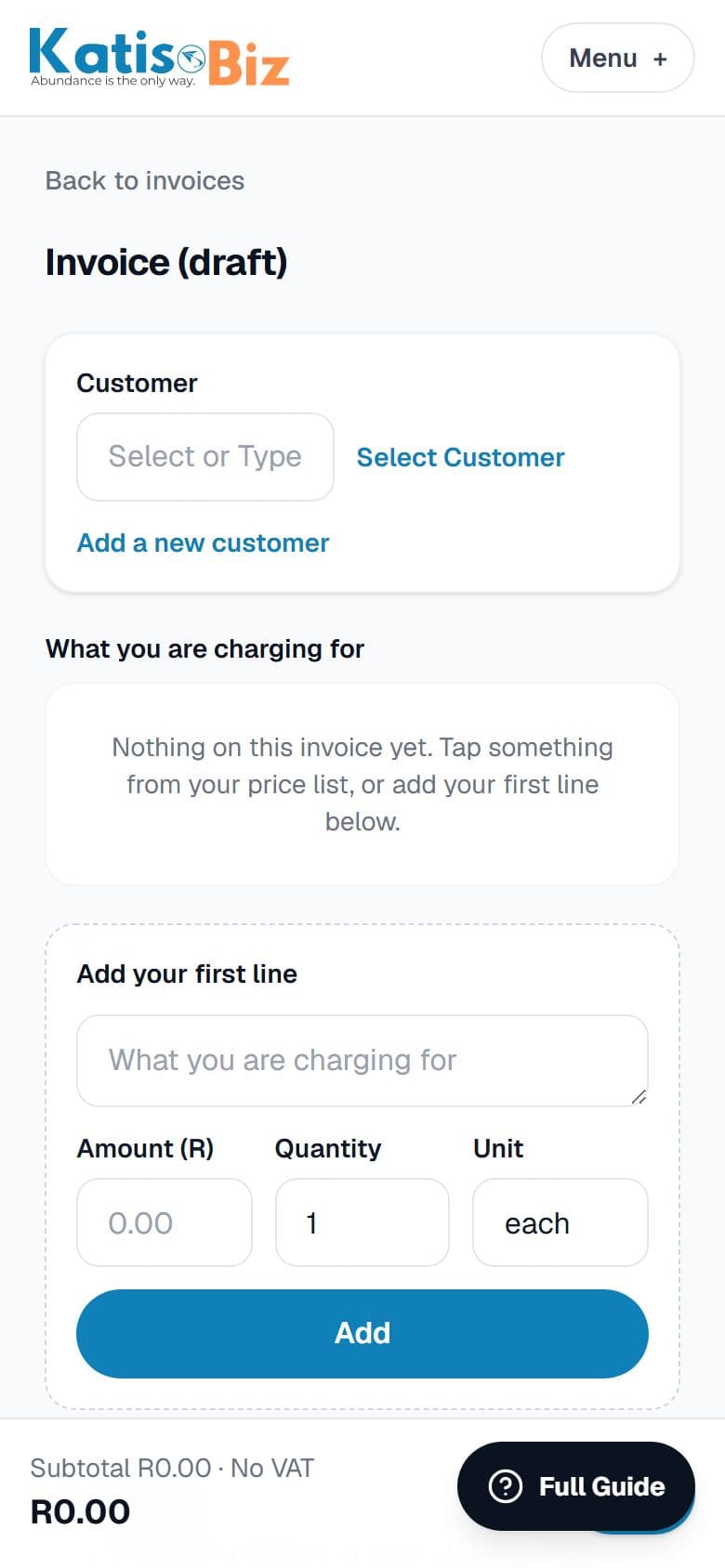
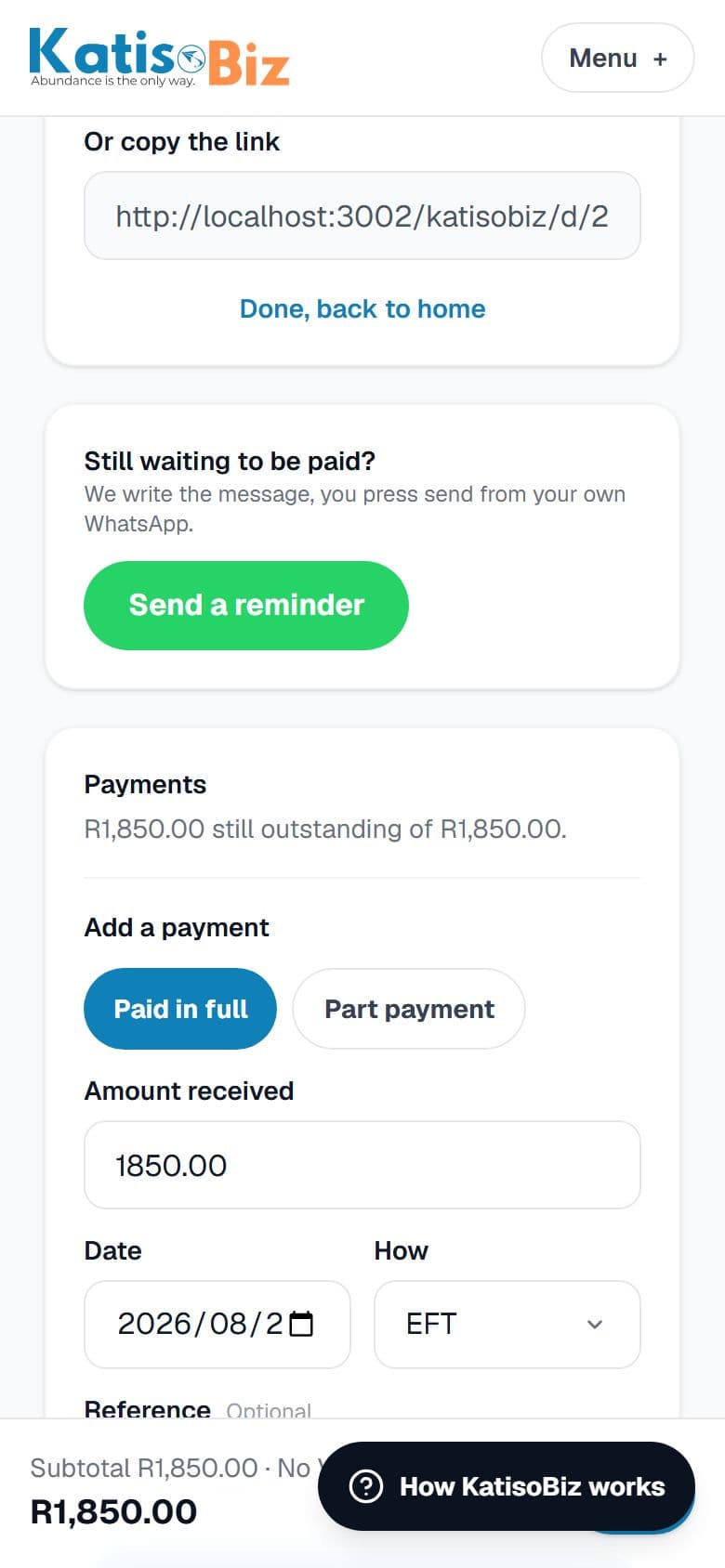
Customer says yes and the job is done, so open the quote and press Turn into invoice. Nothing is retyped. Send it the same way. When the money lands, press Mark paid and say how they paid, or record a part payment if they only paid some of it. No quote for this job? Press New invoice on your home screen or on Invoices and bill straight away.
Seconds
Every screen, and what it is for
In the same order as the menu at the top of KatisoBiz.
Home
Where you stand today, and the four things you do most.
Three numbers across the top: what you have been paid this month, what you are owed, and what is sitting with a customer waiting for an answer. Below that, a counter showing how many documents you have used this month. Then buttons for a new quote, a new invoice, a new customer and your price list. If any invoice has gone past its due date, a chasing section appears above everything else with a Send a reminder button on each one. Anything still open shows in the list at the bottom, and drops off it once it is accepted, declined or paid.
Quotes
Everything you have quoted, and where you build a new one.
A quote is what you send before the job to win it. Building one takes three things: who it is for, what you are charging, and how long it stands. Add lines by searching your price list or typing them in. Press Issue to give it a number, which locks the amounts, then send it on WhatsApp or by email. Once the customer says yes, press Turn into invoice and nothing is retyped.
Invoices
Everything you have invoiced, and what is still owed.
An invoice is what you send after the job to get paid. It can come from a quote or be raised on its own. Your banking details print on it automatically, with your invoice number as the payment reference so you can match the money when it arrives. Record payments as they come in, in full or in part. Once issued the amounts cannot be edited, which is what SARS expects, so corrections go through Fix this invoice instead.
Customers
The people you invoice.
Only a name is required. Add a phone number to send on WhatsApp, an email to send by email, and an address if you are VAT registered and the job is over R5,000, because SARS asks for it at that point. You can add a customer in the middle of building a quote without losing the quote.
Price list
The things you charge for often, so you never type them twice.
Save your callout fee, your hourly rate, the parts you fit most. Each one has a name, how it is charged (per hour, per job, each) and a price. You can add a markup as a percentage or a flat rand amount for things you buy in and sell on, and it shows you what it will actually bill at. Anything you type onto a quote can be saved here with one tap, so the list builds itself while you work.
Reports
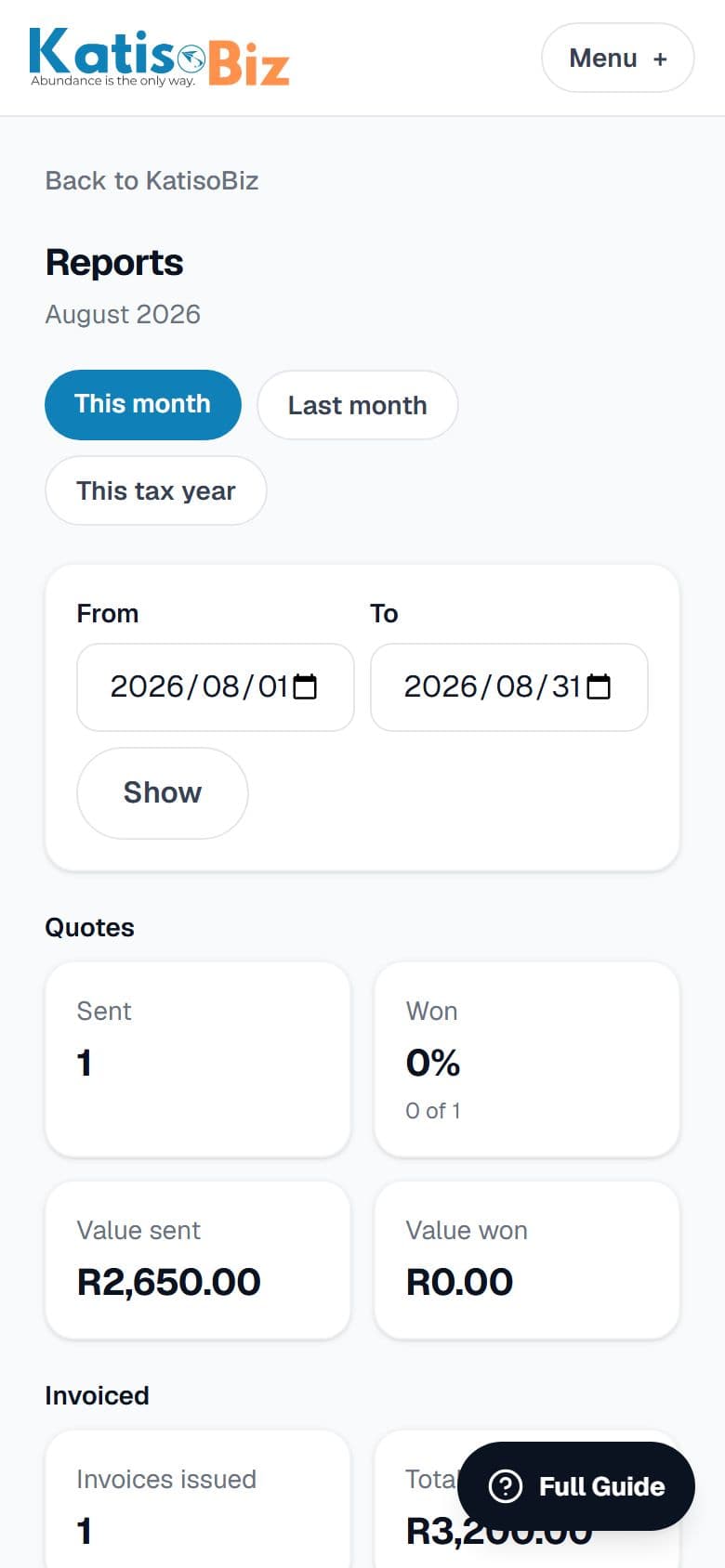
What the business is actually doing, for any period you choose.
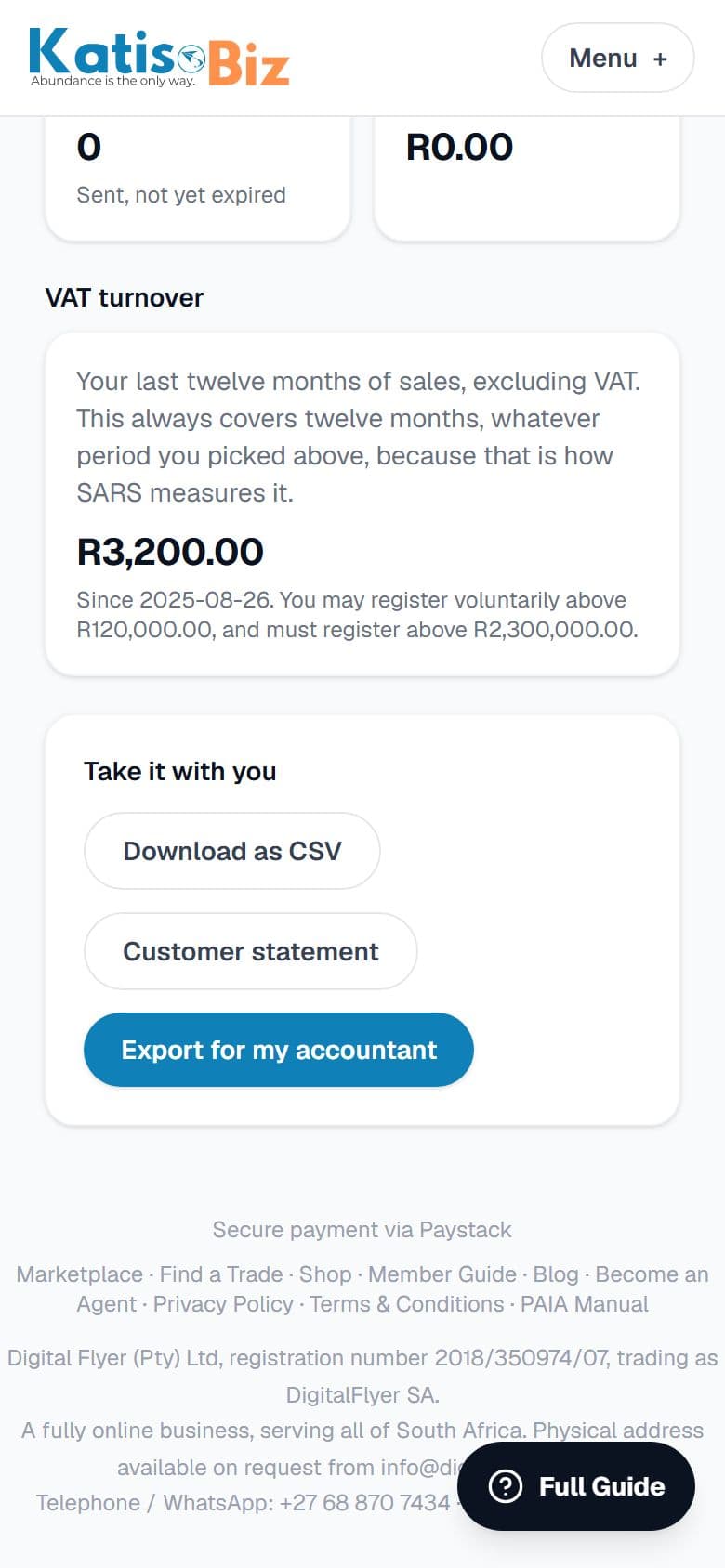
Six reports on one screen: what you quoted and how much you won, what you invoiced, what has actually been paid, who is behind and by how long, what is still sitting out there unanswered, and how close you are to having to register for VAT. Every figure is clickable and opens the documents behind it. From here you also reach a customer statement and the export for your accountant.
History
Everything you have finished with.
Quotes and invoices that are done, split into two tabs and searchable by number or customer name. Anything still open stays on the Quotes and Invoices screens, so those stay about work in progress and this stays about looking something up.
Settings
Your business, your bank, your look, and your plan.
Business details are what print at the top of every document, including your VAT number if you have one. Banking details are where your customers pay you, and changing them later needs a code from your email on purpose. How your documents look is where you pick a template and upload your logo. Insurance work turns on a second price on every item. Your plan is where you upgrade or buy a topup.
How do I ...
Tap a question to see the answer.
Quotes and invoices
How do I send a quote on WhatsApp?
Open the quote, press Issue to give it a number, then press Send on WhatsApp. It opens WhatsApp on your phone with the message ready. You press send yourself, from your own number, so it is not us messaging your customer.
Does my customer need to install anything?
No. They get an ordinary link that opens on any phone or computer. They do not sign up for anything and they do not need an account.
What is the difference between a draft and an issued document?
A draft is yours to change as much as you like and has no number. Issuing gives it a number and locks the amounts, which is what SARS expects. A draft does not count towards your monthly document count.
How do I turn a quote into an invoice?
Open the quote and press Turn into invoice. Everything copies across. It arrives as a draft, so you can adjust it for what actually happened on the day before you send it.
Can I make an invoice without doing a quote first?
Yes. New invoice on the home screen. Some jobs never get quoted and that is normal.
I sent an invoice with a mistake on it. How do I fix it?
Open the invoice and press Fix this invoice. It asks you one question: does the amount need to change? If only the details were wrong, it corrects them and keeps the same number and date. If the amount was wrong, it cancels the old one properly with a credit note and gives you a new one. Both are kept, which is what the law requires. The button only appears once an invoice has been issued, because there is nothing to fix on a draft.
Getting paid
My customer paid me cash before I made the invoice. What do I do?
On the draft invoice there is a section called Already paid something. Put in the amount, the date and how they paid. The invoice then shows the full amount, then what they already paid, then the balance still owing. Nothing gets hidden and your VAT stays correct.
They only paid half. How do I record that?
On the invoice, press Part payment and type the amount. The invoice shows as partly paid and the balance updates. Do it again when the rest arrives.
How do I see who still owes me?
The home screen shows what you are owed. Reports shows it broken down by how overdue it is: inside terms, over 30 days, over 60, over 90. That last group is the one to phone about.
How do I chase a customer who owes me for several jobs?
Reports, then Customer statement. Pick the customer and the period. It lists every invoice, every payment and the balance at the bottom, and you can send it on WhatsApp or download it. It is much harder to argue with than a message saying you still owe me for the geyser.
VAT and SARS
Do I need to be registered for VAT?
Most small businesses are not, and you do not need to be to use KatisoBiz. You only have to register once your sales pass R2.3 million in any twelve months, and you may choose to register once you pass R120,000. Until then your documents say Invoice and no VAT is added anywhere.
How do I turn VAT on?
Settings, Business details, and enter your VAT number. From then on your invoices are titled Tax Invoice, show your VAT number and work out the 15% for you. Documents you have already sent do not change, which is correct: they were right when you sent them.
How close am I to having to register?
Reports has a VAT turnover section. It adds up your last twelve months of sales and shows you against both markers. It always looks at twelve months no matter which period you picked, because that is how SARS measures it.
Why is it asking for my customer's full address on a big invoice?
Once a VAT invoice goes over R5,000, SARS wants the customer's full name and address on it. KatisoBiz asks at the moment you cross that line rather than letting you send something that is not right.
How long do I need to keep my invoices?
SARS generally wants five years. KatisoBiz keeps them for you and you can download the lot at any time.
Your prices and your customers
How do I add a price I use often?
Price list, then Add a price. Give it a name you will recognise, say how it is charged (per hour, per job, each) and put in the price.
I typed a price on a quote. Can I keep it?
Yes. On that line press Save to price list and it is there next time. The line keeps the price you typed.
I buy parts and sell them on. Can it add my markup?
Yes. On the price, choose Percentage or Rand amount and put in your markup. It shows you what it will actually bill at before you save.
I charge different rates for insurance work. Can it handle that?
Yes, but it is off until you ask for it. Settings, Business details, Insurance work, then Turn insurance rates on. Each price then gets a private price and an insurance price, and every quote has a choice at the top of which rates to use. Leave an insurance price blank and it just uses the private one.
I have a lot of prices. How do I find one?
Start typing in the box above your price list on a quote and it narrows down as you type.
How your documents look
Can I put my logo on them?
Yes, on the R49 plan. Settings, Business details, Your logo. It appears at the top of everything you send from then on. Anything already sent stays as your customer received it.
Can I change the layout?
Yes. Settings, Business details, How your documents look. There are five to choose from. The free plan uses Clean; the other four come with the R49 plan.
Why do my banking details have a warning next to them?
Because invoice fraud is common here. Someone intercepts an invoice, changes the account number and your customer pays a stranger. The line tells your customer that your details never change and to phone you if they get a message saying otherwise. You can turn it off in Settings if you would rather not have it.
Your accountant, and your records
How do I give everything to my accountant?
Reports, then Export for my accountant. Pick the period and it makes a link. Send that link to your accountant on WhatsApp or email. They get one file with every invoice, credit note and payment as spreadsheets they can open in Excel, all the PDFs, and a cover page with the totals.
Why a link and not just a file?
Because that file has your customers' names and addresses in it, and an attachment sits in an inbox forever. The link stops working after 14 days, and you can stop it sooner from the same screen. You can also see whether your accountant has opened it.
I do not have an accountant. Can you help?
There is a link on that screen to find one on the DigitalFlyer SA marketplace.
Where do I find an old quote or invoice?
History in the top menu. It holds everything you have finished with, split into quotes and invoices, and you can search by number or by customer name. Anything still open stays on the Quotes and Invoices screens.
Plans and payment
Is the free plan really free?
Yes. Ten documents a month, every month, no card. A quote and an invoice count as two documents. Drafts do not count, only what you send.
What happens if I run out of documents?
You can carry on building quotes, you just cannot send them until you add more. You will have seen a counter all month and warnings as you got close, so it should not be a surprise.
How do I upgrade?
Settings, then Your plan. Or tap the document counter on your home screen. You can pay for R49 a month, R89 a month, or buy a one-off top up of 75 more documents. Top ups never expire.
I already pay for DigitalFlyer Growth. Do I pay again?
No. KatisoBiz comes with Growth Engine and Enterprise at no extra cost. Your plan screen will say so and will not offer you anything to buy.
Can I cancel?
Yes, any time, and you keep everything you have already made. You go back to the free plan rather than losing your records.
Chasing money
How do I remind someone who has not paid?
Once an invoice passes its due date it appears in a chasing section on your home screen with a Send a reminder button. Press it and WhatsApp opens with the message already written, including what they owe and a link to the invoice. You press send. KatisoBiz never messages your customers by itself.
What does the reminder say?
It is polite and short, because most people find asking for money awkward and that is why they put it off. It greets them by name, says which invoice and how much, mentions the due date, gives them the link, and says that if they have already paid they should ignore it. You can edit it in WhatsApp before sending.
Does it chase the full amount if they part paid?
No. It chases what is actually still owing. Reminding someone for the full amount after they have paid half makes you look disorganised.
Will it nag my customer?
Never on its own. It also shows you when you last reminded them, so you do not accidentally chase the same person twice in a morning.
How do I know who is worst?
Reports shows who is behind, grouped by how overdue: inside terms, over 30 days, over 60, over 90. Tap any group to see exactly which invoices are in it.
Reports and what they mean
What does the win rate mean?
How many of the quotes you sent in that period were accepted. If you sent ten and won four, it says 40%. It stays blank rather than showing 0% when you have not sent any, because 0% would be a lie.
Why does the outstanding figure not change when I change the period?
Because what you are owed is what you are owed today, not what you were owed in March. The same is true of the aged groups and of open quotes. Those figures say As things stand today when you open them.
What does 61 to 90 days mean exactly?
How far past the due date it is, not how old the invoice is. An invoice sent last week on 30 day terms is not late, so it sits in the first group rather than being counted against you.
Why does the VAT report ignore the period I picked?
Because SARS measures your turnover over any twelve months in a row, so that figure always covers twelve months no matter what period you are looking at. Changing the period would give you a number SARS does not use.
Can I get the numbers into a spreadsheet?
Yes. Download as CSV on the reports screen, and on any customer statement. They open in Excel.
Your information and your customers' information
Who can see my customer list?
Nobody else using KatisoBiz. Your data is separated from every other business on the platform and is never shared with them. Our staff do not access it in the course of normal support.
Are my banking details safe?
They are encrypted, and reading them is restricted and logged. Changing them needs a code sent to your email, which exists so that somebody who gets into your account cannot quietly swap in their own account number.
Why does my invoice show my full account number?
Because your customer has to be able to pay you. It is on the document you chose to send them, the same as it would be on a printed invoice.
What happens to my customers' details?
They are yours. We hold them so the product can work, and we act on your instructions with them, not on our own. If one of your customers asks us to delete their information we refer them to you, because it is your relationship, not ours.
How long is everything kept?
Financial records are kept for five years, because SARS requires it. You can download everything at any time.
When something is not working
My code did not arrive
Check your spam folder first, that is usually it. On the code screen there is a Send me a new code button, and a Start again button if you typed your email wrong. The code is longer than six digits, so make sure you have copied all of it.
My customer says the link does not open
The link works on any phone or computer with no login. If they are struggling, download the PDF from the document and send them that instead. It is the same document.
I cannot send a quote
Two usual reasons. Either you have not chosen a customer yet, or you have used up this month's documents. The screen will say which.
Something else is wrong
WhatsApp us on +27 72 311 0570 or email info@digitalflyer.co.za. Tell us the document number if it is about a particular quote or invoice, it makes it much quicker.
Still stuck? Ask a person.
WhatsApp +27 72 311 0570 or email info@digitalflyer.co.za. If it is about a particular quote or invoice, send us the number on it and we will be much quicker.